

Home / Before you travel
Kung Fu Zen · Before you travel
China Arrival Card
A step-by-step guide to China’s official online arrival card, for martial arts training, retreats and TCM stays. Use your own confirmed travel and accommodation details.
Free of charge. Use only the official portal.
The National Immigration Administration (NIA) does not charge for the arrival card. Enter passport information only on the official NIA website or its official channels — not on this website and not on a paid imitation site.
The arrival card does not replace a visa or establish your right to enter China. Read the official instructions and check the entry rules that apply to your nationality, purpose and length of stay.
Before you start
Have your passport data page, arrival and departure travel details, accommodation address and contact details ready. Use the spelling and numbers exactly as shown in your documents.
Important: the screenshots illustrate the form fields. Their example dates, airports, entry-policy selections and onward cities are not instructions for every guest. Use your own confirmed itinerary and the entry policy that applies to you.
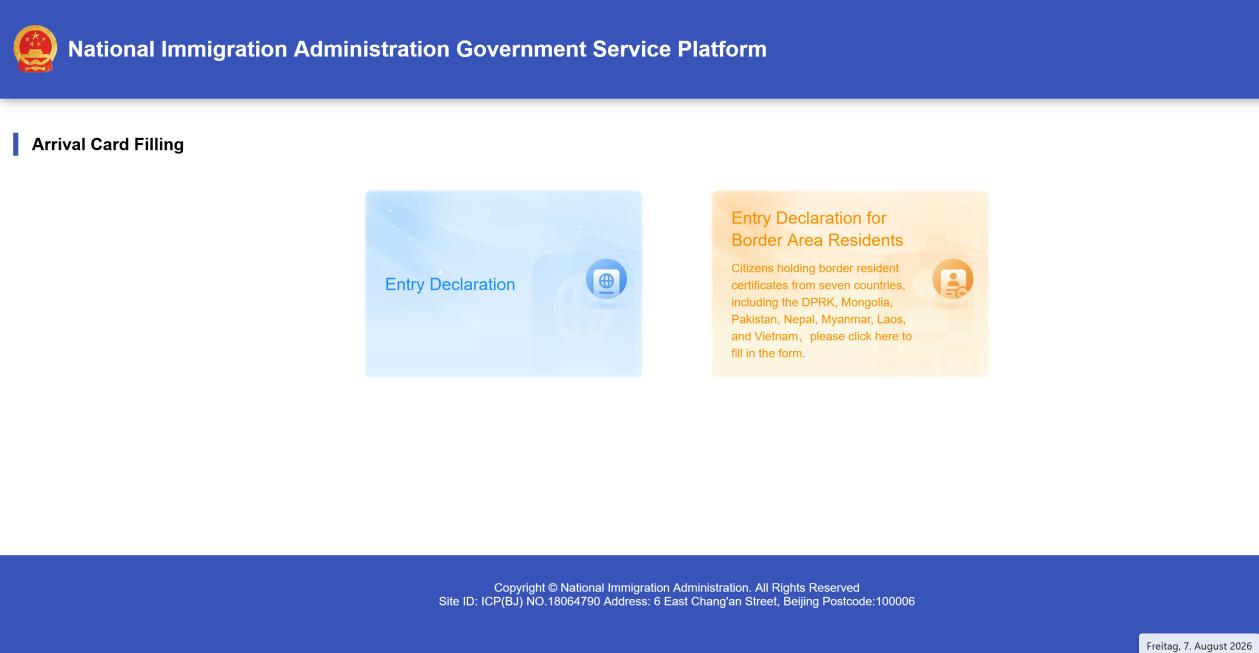
1. Choose “Entry Declaration”
Open the official NIA portal and choose Entry Declaration. The separate border-area-resident option is intended for the document holders described there.
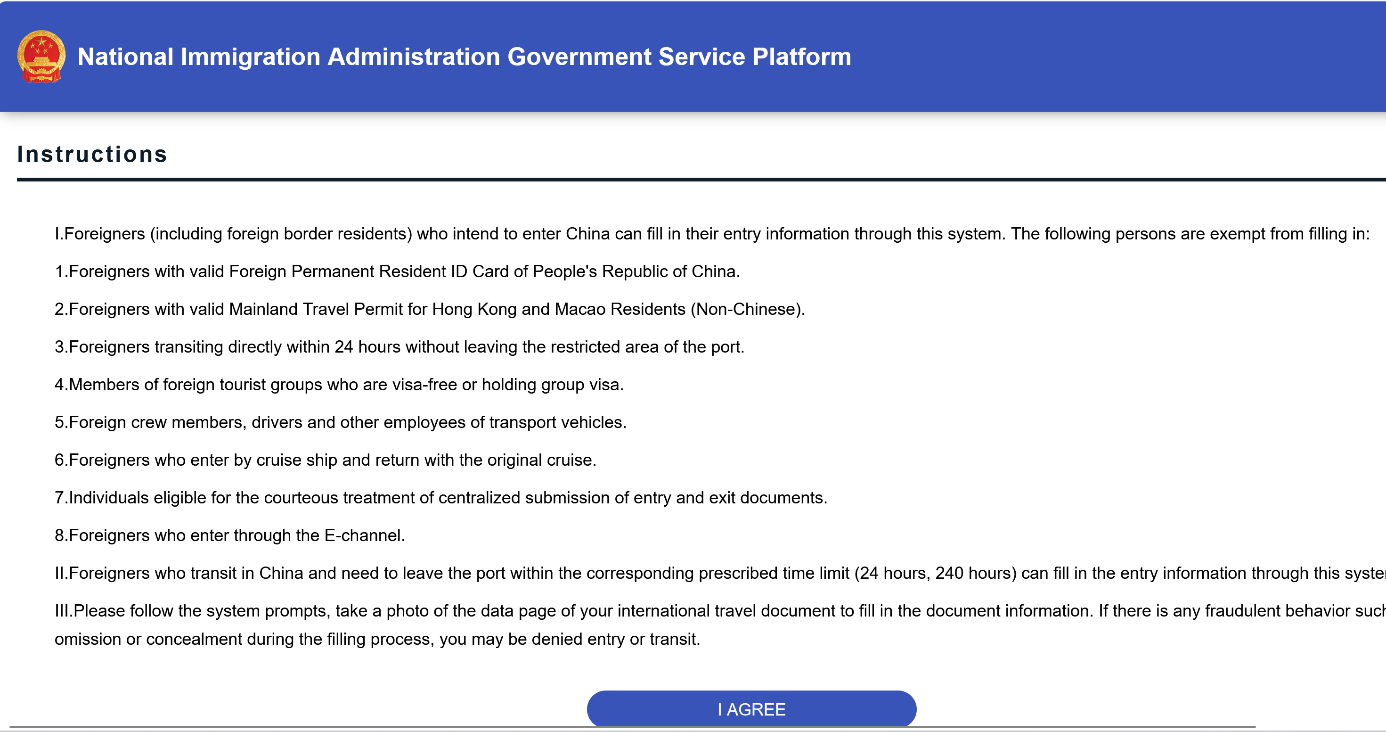
2. Read the instructions
Read the instructions, including the exemptions. If the form applies to you and you agree to the statement, choose I AGREE.
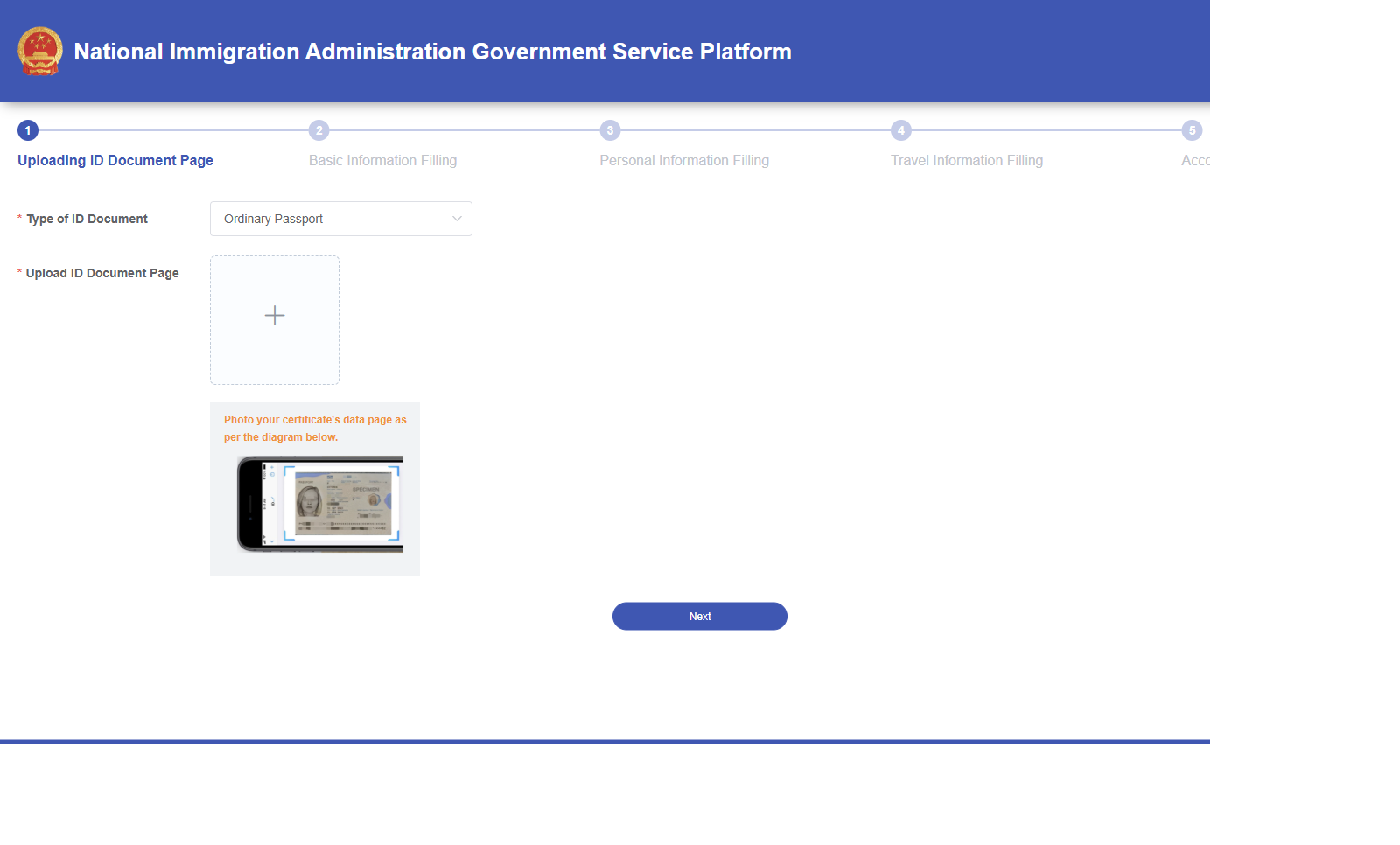
3. Upload your passport data page
Select the appropriate document type and upload a clear photo of the data page as requested by the official portal. This is the page with your photograph and passport details.
The screenshot below shows the official upload step checked on 16 November 2026. No personal passport data has been entered.
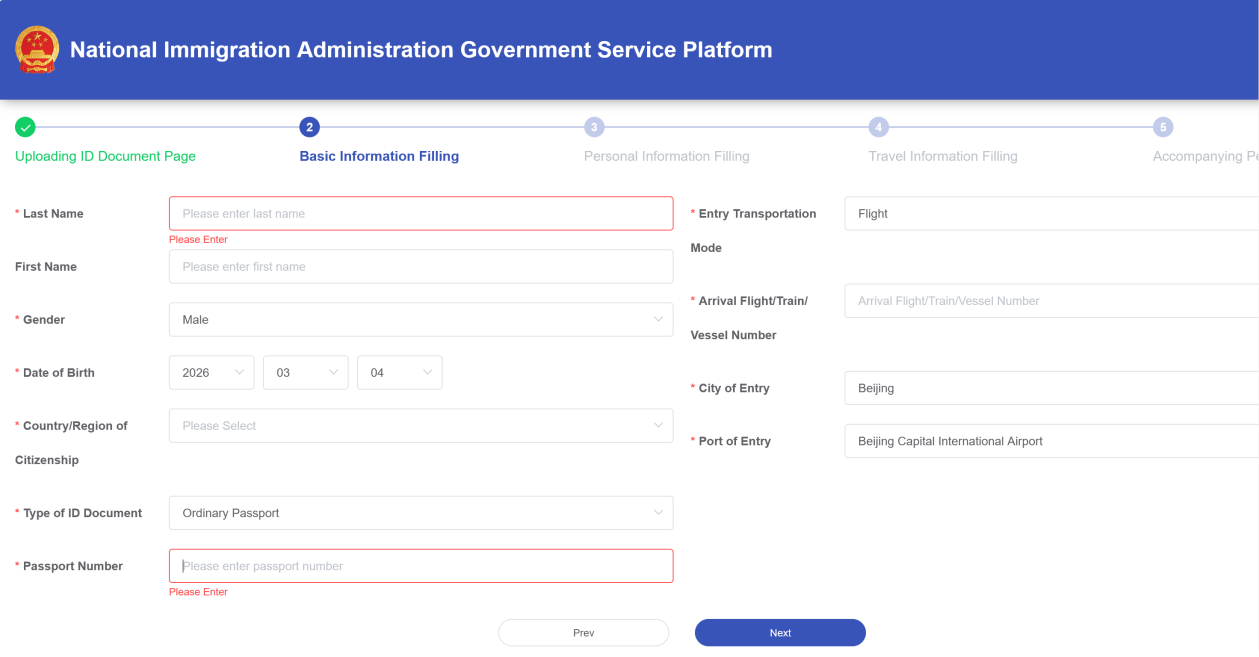
4. Check your basic information
Check every automatically recognised field against your passport: name, date of birth, nationality and document number. Correct any recognition errors.
Enter your actual means of arrival, flight or other service number, city and port of entry. Do not copy Beijing or an airport shown in the example unless it is your real arrival point. Then choose Next.
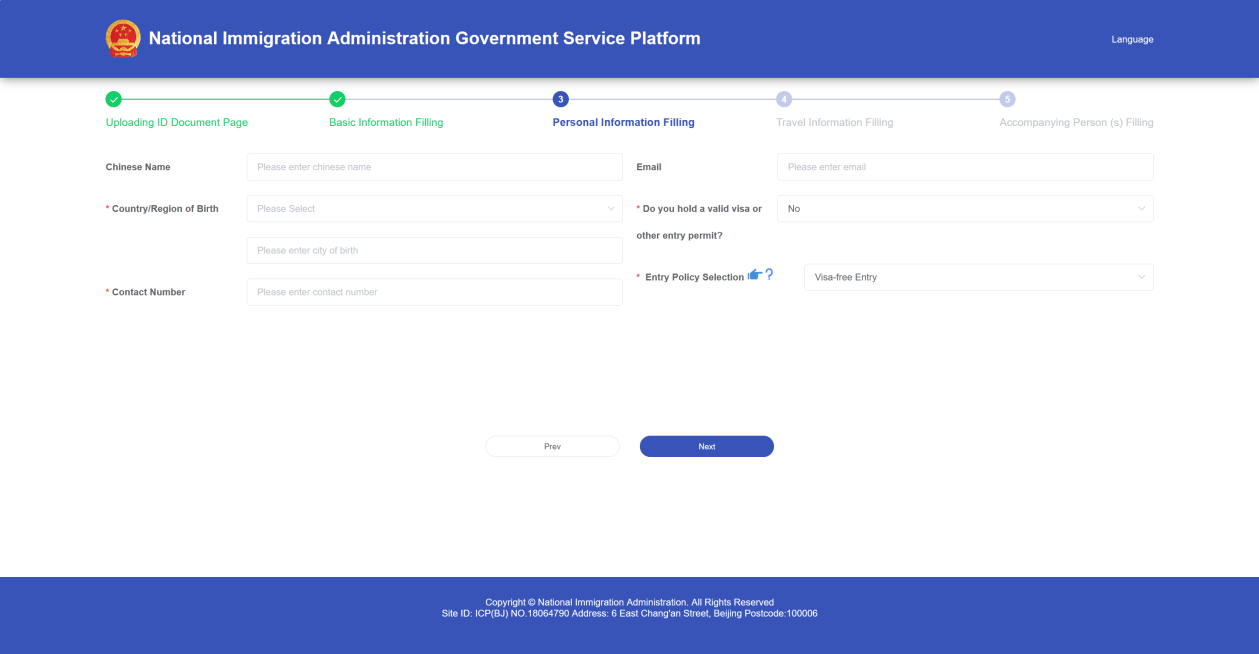
5. Enter your personal and entry-policy details
Complete the required personal and contact fields. There are two options here: visa-free entry or entry with a visa. Select the one that applies to your own journey and enter the details requested by the form.
Many European visitors travel to China without a visa. Whether you may do so depends on your nationality, the purpose of your visit and the length of your stay. Each traveller is responsible for knowing which entry option applies to their trip and choosing it accordingly. If you are travelling with a visa, use the visa option and your actual visa details. If you are unsure, clarify your entry requirements before submitting the form.
6. Enter your itinerary and accommodation
Enter your actual arrival date, destination cities and departure details. Answer the purpose-of-entry and inviting-person/entity questions according to your own journey and documents.
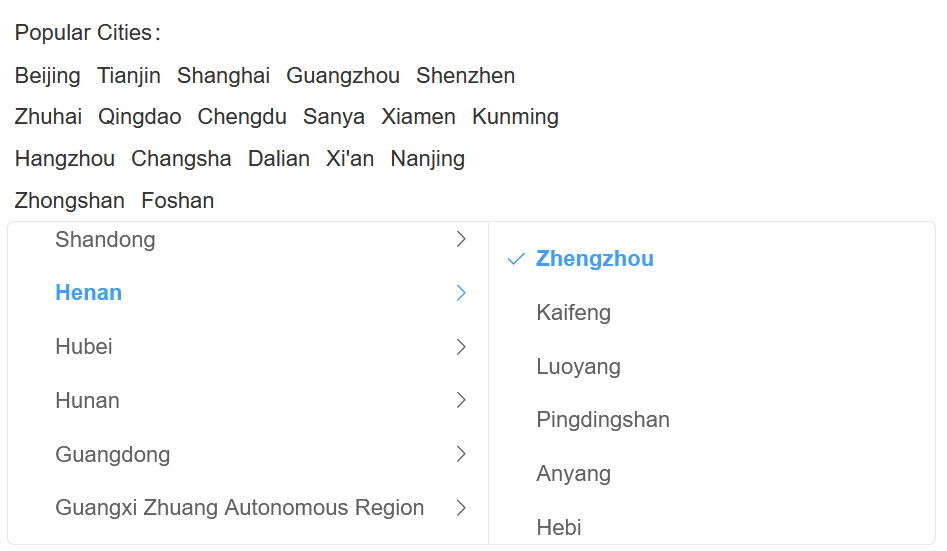
If your stay is in Dengfeng, select Henan → Zhengzhou. Dengfeng is administratively part of Zhengzhou and cannot be selected separately in this city selector. For a stay elsewhere, choose the city that matches your actual destination.
Your accommodation address depends on the programme you have booked — martial arts training, a retreat or TCM treatment. We will send you the correct address with your registration details. If we have forgotten to include it, please email us and ask for it before completing this part of the form.
7. Decide whether to fill in another person’s form
The prompt asks whether you need help filling in a companion’s form. Choose No if you are not adding another person here — even if you are travelling with a group. Choose Yes only if you intend to enter that person’s details and follow the portal’s instructions.
This guide does not walk through the additional-person branch.
8. Review, sign and confirm
Review all your entries. Read the declaration, tick the agreement box if you agree, sign in the designated area and choose Confirm. Follow any further prompts until the portal confirms successful submission.
Keep the arrival-card confirmation
After successful online submission, keep the arrival-card QR code or confirmation provided by the official portal available for arrival. Do not assume that reaching the signature screen alone means the form has been submitted.
If you cannot complete the card online in advance, the NIA says that on-arrival options include the official facilities at the port and paper arrival cards. Follow the instructions of immigration staff.
About these screenshots
The screenshots illustrate the desktop portal; the mobile layout may differ. Click an image to enlarge it. The guidance applies to training, retreats and TCM stays — no example accommodation address should be copied.
Checked on 16 November 2026: the official portal, Entry Declaration, instructions and passport-upload step. Later steps are explained using 2026 example screens; labels may change. No personal passport data was entered and no test declaration was submitted.
Official sources
Personally checked. Personally supported.
Personally checked by Li Nian Yi — the founder who knows every master we work with and stays at your side in China.
Questions before you travel?
Ask us about your programme, accommodation and the practical details of your stay.